Free Fontsmith Collection for Affinity Users: How to Download & Install

Own Affinity V1 or V2? You’re eligible for a massive free gift! Learn how to claim the Fontsmith Collection (453 styles) from Canva and Serif. Follow our step-by-step guide to unlock these premium fonts today.
How to Download & Use the Free Fontsmith Collection in New Affinity

For Affinity V1 and Affinity V2 Users

If you bought Affinity Designer, Affinity Photo, or Affinity Publisher (V1 or V2) in the past, you might have heard that Serif and Canva gifted users a massive premium font collection for free — and then wondered: where is it?

You’re not alone. Many users struggle to find, unlock, or even confirm whether they’re eligible. This guide walks you through exactly how to access, download, and use the Fontsmith Collection, step by step, without confusion.


How to Unlock the Fontsmith Collection (Step-by-Step)

🔹 For Affinity V2 Users

Affinity Designer Welcome Screen

Step 1: Open the Welcome / Account Screen

  • Open any Affinity V2 app
  • Click Account (top-right)
  • If you don’t see it, open the Welcome screen first

Step 2: Sign In

  • Use the email you originally used to purchase Affinity
  • This links your purchase to your Affinity ID

Step 3: Manage Purchased Content

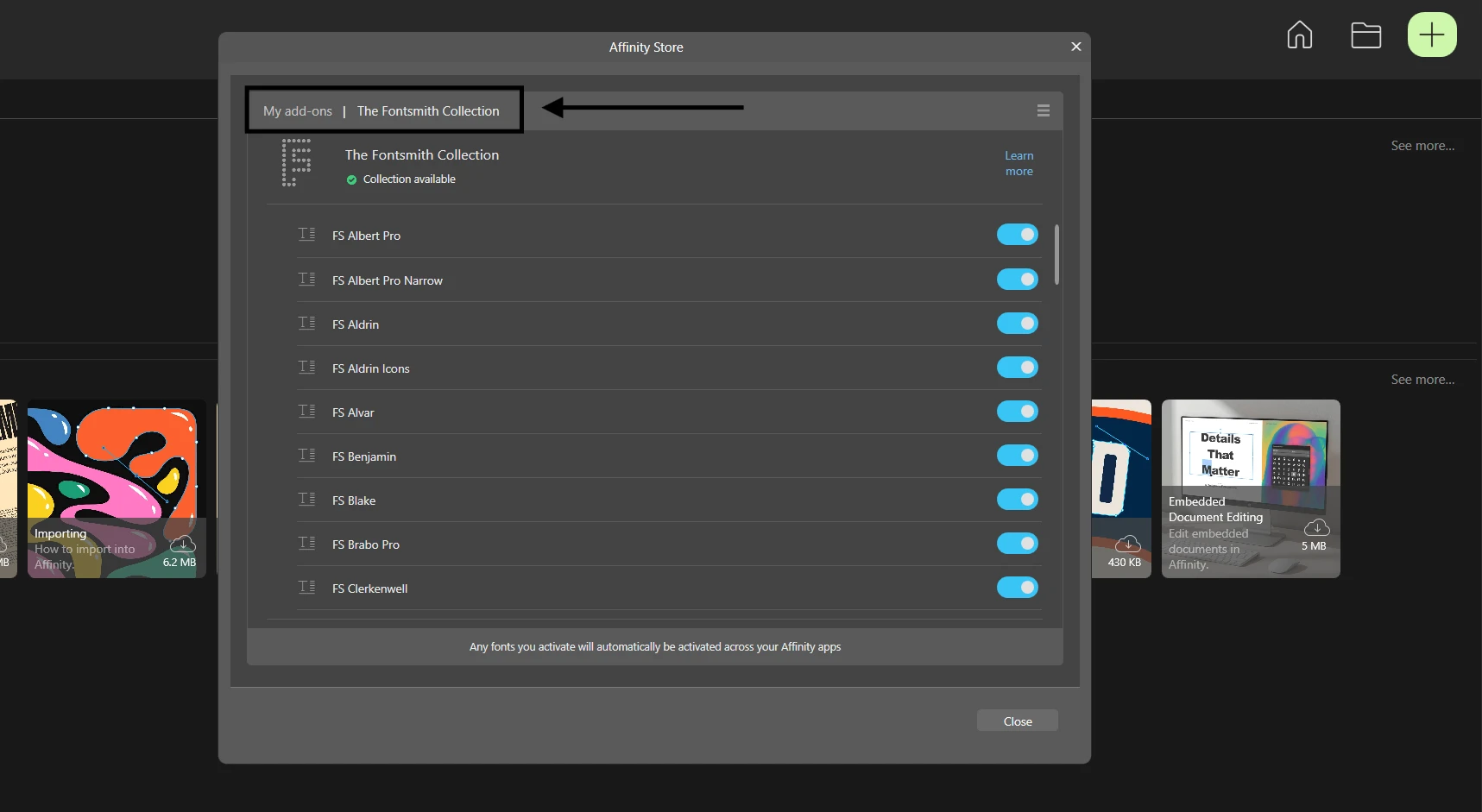
  • On the Account screen, find Fontsmith Collection (its next to "My Addons")
  • Then you can toggle the fonts you want to use.

Tips

  • You don’t need to install all fonts at once
  • Keep an internet connection during the first install
  • Restart Affinity if fonts don’t appear immediately

🔹 For Affinity V1 Users

⚠️ Important warning:
The Fontsmith fonts cannot be used inside Affinity V1.

Step 1: Register Your V1 Purchase

  • Open Affinity V1
  • Click My Account
  • Sign in or create an Affinity ID

Step 2: Download the New Affinity App

  • The fonts are accessed through the new Affinity app / V2
  • Your registered purchase unlocks the fonts automatically

Step 3: Link Your Canva Account (If Required)
  • Needed to sync font access in newer versions

🔹 How To Find The Free Font Collection in New Affinity?

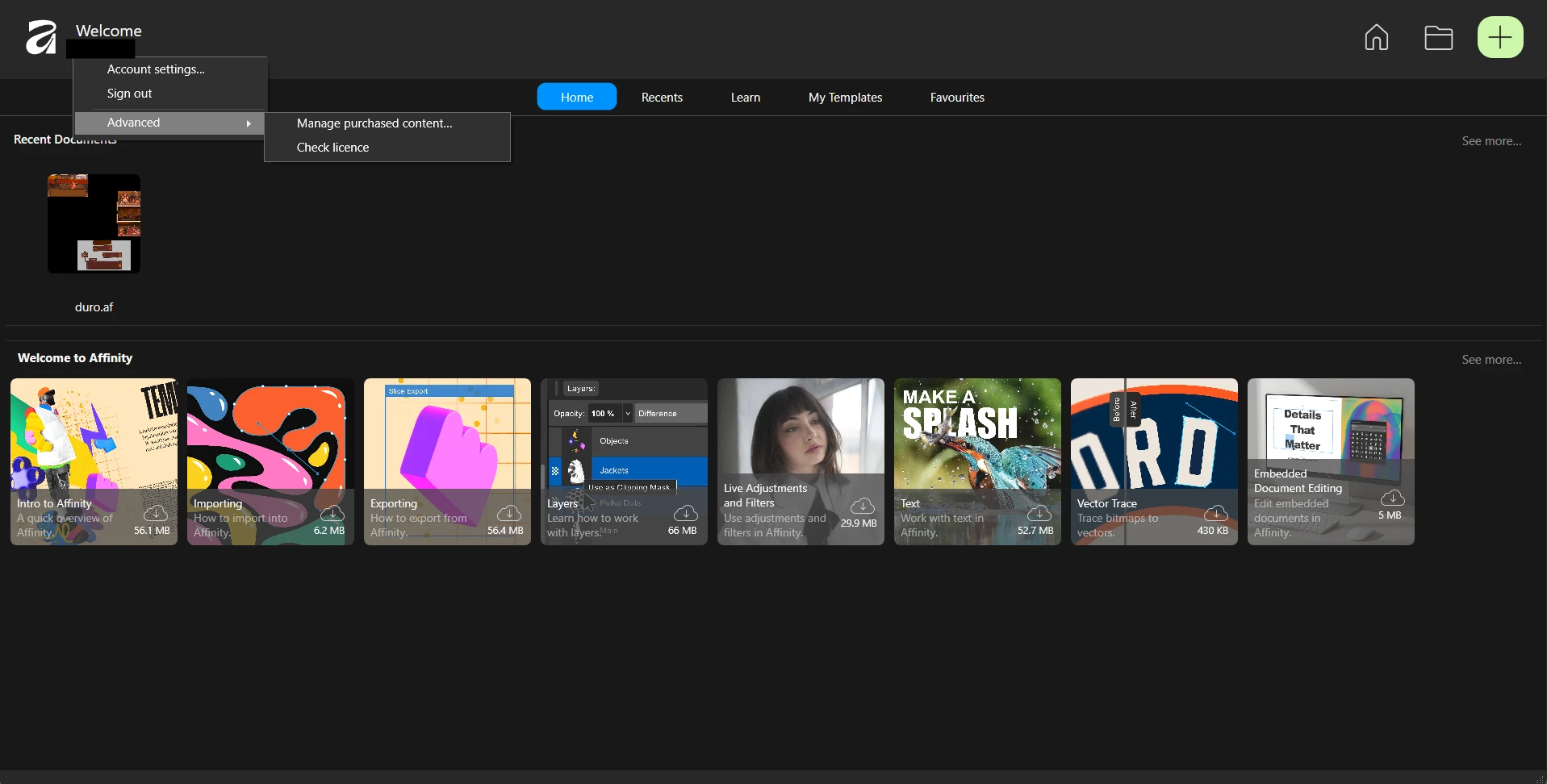
Step 1: Open the new Affinity

  • Open the new Affinity App
  • Click your name at the top left corner
  • Hover over "Advanced"
  • Click "Manage purchased content"

Then you'll see this screen:

Affinity Store
  • If you don't see the font list, switch to "The Fontsmith Collection"
  • The Affinity Store may initially display the "My Addons" tab

What Is the Fontsmith Collection?

The Fontsmith Collection for Affinity is a curated library of:

  • 51 font families
  • 453 font styles
  • Designed by professional type designers
  • Normally worth thousands of dollars if licensed individually

The fonts range from clean sans-serifs to expressive display fonts and are suitable for branding, editorial design, UI, posters, and more.

✔️ Allowed for personal and commercial use
✔️ Premium-quality, not trial fonts


Who Is Eligible for the Free Fonts?

You can claim the Fontsmith Collection if:

  • You purchased Affinity Designer, Photo, or Publisher
  • Version V1 or V2
  • Before November 1, 2025

❌ Users who only downloaded a free trial or free version after that date are not eligible.

Where to Find & View the Fonts

Affinity Free Font

Once installed:

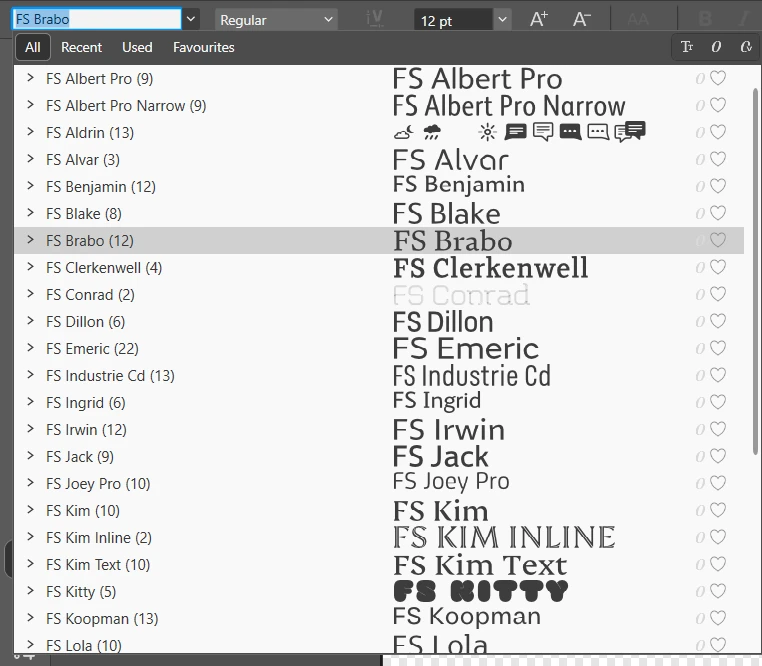
  • Open any Affinity document
  • Select the Text Tool
  • Scroll through the font list
  • All Fontsmith fonts start with FS or SC

You can also preview them directly in the Manage Purchased Content panel.


Frequently Asked Questions (FAQ)

Fonts Not Showing?

  • Restart Affinity
  • Check you’re signed into the correct Affinity ID
  • Confirm your purchase date

Purchased via App Store?

  • Register the purchase manually in My Account
  • Fonts won’t sync until it’s registered

Can’t Use Fonts in V1?

  • This is expected — V1 does not support the collection

Can I use free fonts in Affinity commercially?

Yes. Commercial use is allowed under the Fontsmith EULA.

Can I use the free fonts outside Affinity?

Only as permitted by the license — always check usage restrictions.

Do I need Canva Pro to get the free fonts?

No, but you may need to link a Canva account for syncing.

Can I share the fonts with others?

No. The license is tied to your account.

Is the free gift for Affinity V1/ Affinity V2 user permanent?

Yes, if you’re eligible and claim it.

yorubox.team
yorubox.team
Articles: 6

Leave a Reply

Your email address will not be published. Required fields are marked *